
Link Tracking Profiles
Link tracking profiles let you configure and automate the query parameters that are appended to links in your emails.
Tracking is applied to url fields, and to any links within rich_text fields. Any other links can be tracked with the track_link filter.
To create a profile, go to the Dynamic Content page and open the Link tracking profiles tab. Then, click Create link tracking profile to get started.
Parameter Types
Section titled “Parameter Types”You can choose from four types of parameters:
Fixed Value
Section titled “Fixed Value”Fixed value parameters are static — they’re defined once and automatically added to every URL in your email.
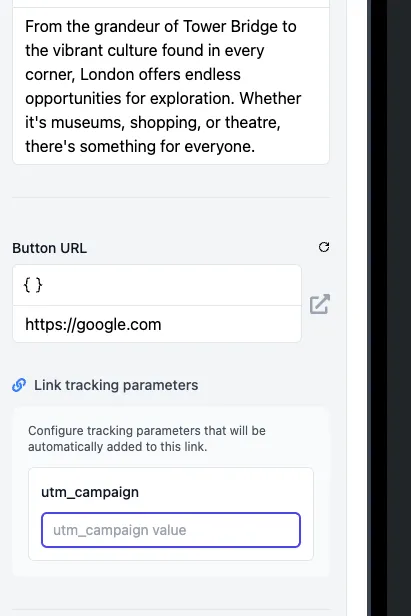
Editor Field Value
Section titled “Editor Field Value”This type displays an input next to each URL field in the email editor, allowing you to assign different values to individual links.
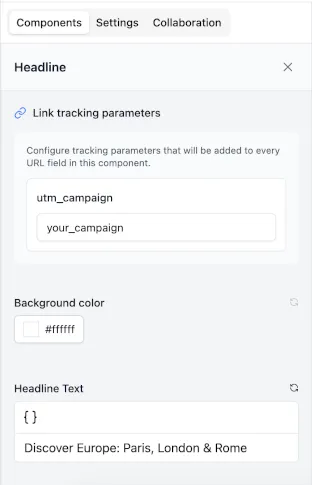
Editor Component Field Value
Section titled “Editor Component Field Value”This displays a single input in each component instance in the email editor. The value entered here will apply to every tracked link within this component.
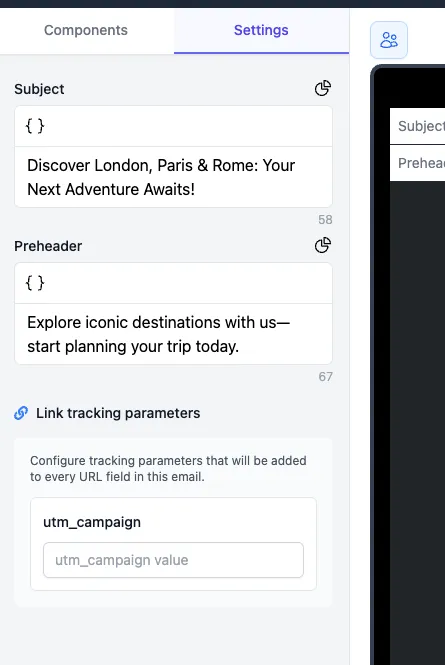
Editor Global Field Value
Section titled “Editor Global Field Value”This displays a single input in the editor’s settings panel. The value entered here is applied to all tracked links in the email.
Custom Templates
Section titled “Custom Templates”You can customize how tracking parameters are rendered using custom templates.
A custom template is written in Liquid and gives you full control over how URLs are constructed. These templates have access to the render context object, allowing for dynamic and personalized link generation.
Within your template:
- The original URL from the editor is available as
url_value. - Any configured parameters are accessible via the
parametersobject — for example,{{ parameters.utm_source }}.
Template Examples
Section titled “Template Examples”Basic Example
Section titled “Basic Example”This template is similar to the default behavior and assumes two parameters: utm_source and utm_campaign. It also handles whether or not the URL already contains a query string.
{%- if url_value contains '?' -%} {%- assign first_separator = '&' -%}{%- else -%} {%- assign first_separator = '?' -%}{%- endif -%}{{- url_value -}}{{first_separator}}utm_source={{parameters.utm_source | url_encode}}&utm_campaign={{parameters.utm_campaign | url_encode}}Using the Render Context
Section titled “Using the Render Context”This version pulls values directly from the render context, so no manual parameters are needed. It automatically includes:
- The email name as the utm_campaign value
- The component name as the utm_content value
{%- if url_value contains '?' -%} {%- assign first_separator = '&' -%}{%- else -%} {%- assign first_separator = '?' -%}{%- endif -%}{{- url_value -}}{{first_separator}}utm_campaign={{render_context.email.name | url_encode}}&utm_content={{render_context.component_instance.component_name | url_encode}}This approach is powerful because it allows you to track exactly where each click came from — down to the specific component that rendered the link. For example, if a link is repeated in multiple parts of an email, you’ll be able to identify which instance of the link was clicked. It provides a high level of granularity in your reporting and insights.
Conditional logic
Section titled “Conditional logic”You can tailor link tracking based on dynamic conditions — for instance, varying tracking by country, connector type, or project. Here’s an example using locale-based logic:
{% if render_context.email.locale == 'en-US' %} {{url_value}}...{% else %} {{url_value}}...{% endif %}Tracking non-field links
Section titled “Tracking non-field links”You might have links in your component that don’t come from a url field, or a rich_text field, they may be hardcoded into the template. To track these links, use the track_link Liquid filter:
<a href='{{ "https://example.com" | track_link }}'>Click here</a>Overriding editor field values
Section titled “Overriding editor field values”Because these links have no corresponding field in the email editor, there is nothing for an Editor Field Value parameter to read from. You can supply these values directly to the filter instead:
{{ "https://example.com" | track_link: utm_content: "social-media" }}Skipping link tracking for specific fields
Section titled “Skipping link tracking for specific fields”There are cases where you may want to skip link tracking for specific fields. This can be done by checking the Skip link tracking checkbox when creating a url field in the Component Builder.